How to Tag A Product on Facebook

Tag Facebook Products

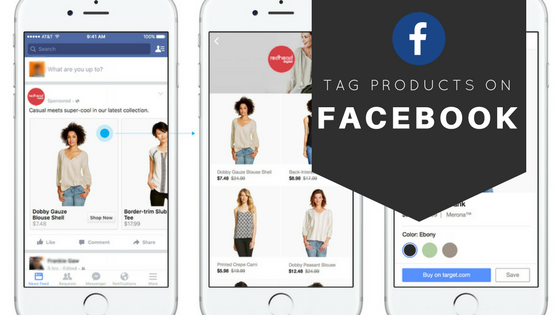
If at any time you post products (or packaged services) on your business Facebook page then you’ll increase your conversion by tagging your products.
Tag A Product Facebook


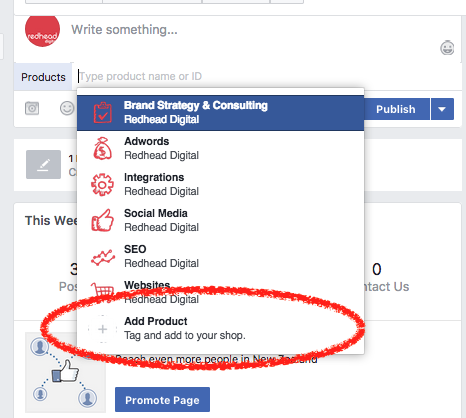
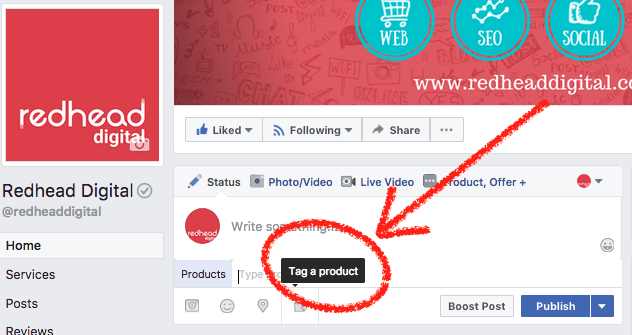
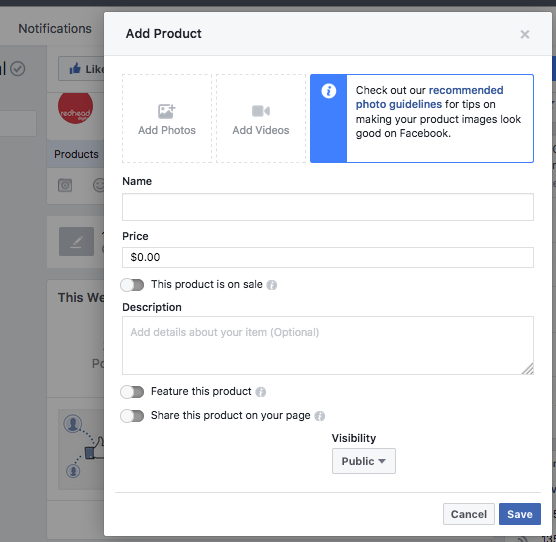
Facebook’s been testing product tags since October last year, but looks to have expanded them significantly in the past week. When you click on the Product Tag option on any post, you’re taken to a set-up screen which enables you to add products, with individual listings for each.

For each product you add, you can provide a name, price and description, along with an image, and a URL which links through to a web page where users can make a purchase.

That item is then added to the ‘Shop’ section of your Page, where you can easily tag it in future posts.

Within Business Manager, you are able to import entire catalogs which makes selecting products for advertising super easy.


Save

Save

Save

Kaahu Kids – Case Study

Kaahu Kids – Case Study

Client: Kaahu KidsService: Lightning Launch Shopify Website ProjectGoal: A simple, heartfelt online store to share…

How to Set Up Rural NZ Shipping in Shopify Without Calculated Carrier Rates

How to Set Up Rural NZ Shipping in Shopify Without Calculated Carrier Rates

🚨 UPDATE: August 2025 Price Alert: Since writing this post, both Kiwisprout (now NZ$302/year) and…

Do You Own Your Domain Name? Why You Should Double-Check

Do You Own Your Domain Name? Why You Should Double-Check

Of course you own your own domain right? Or do you? What is a domain?…

Sign up to occasionally hear from me with mind-blowing SEO & website conversion rate hacks straight to your inbox.

No spam here. Seriously worthwhile info only and of course you can unsub at any time.